Invoice History
The Invoice History dialog displays the following invoice activities, if applicable
-
Void
-
Unvoid
-
Vouchered
History Dialog
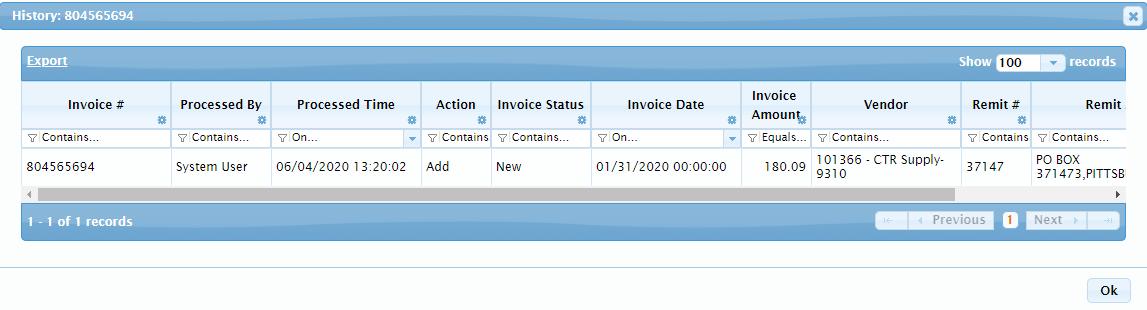
| Column | Description |
|---|---|
| Selection Checkbox | Click in the checkbox to select and invoice and perform actions on it. Actions include Convert to Voucher, Void, and Unvoid. |
| Invoice # | Displays the Invoice # from the emailed or uploaded invoice. |
| Processed By | Displays the name of the user who performed the action. |
| Processed Time | Displays the date and time of the performed action. |
| Action |
Displays an action of Add or Update.
|
| Invoice Status | Displays a status of New, Void or Vouchered. |
| Invoice Date | Displays the Invoice Date from the emailed or uploaded invoice. |
| Invoice Amount | Displays the Invoice Date from the emailed or uploaded invoice. |
| Vendor | Displays the Vendor from the emailed or uploaded invoice. |
| Remit # | Displays the remit number assigned by the system. |
| Remit Address | Displays the remittance address from the invoice. |
| Account # | Displays the GL Account # the invoice is allocated to. |