CEDNet Voucher Payment Status
The CEDNet Voucher Payment Status button in the navigation bar launches the CEDNet Voucher Payment Status - Search Purchase Vouchers screen. Invoices in 'Batched' or 'Paid' status are displayed in the search results of this screen.
Use the Expense Invoice Management button at the top right of this screen to return to the Search Invoices screen and additional navigation for managing Expense Invoices.
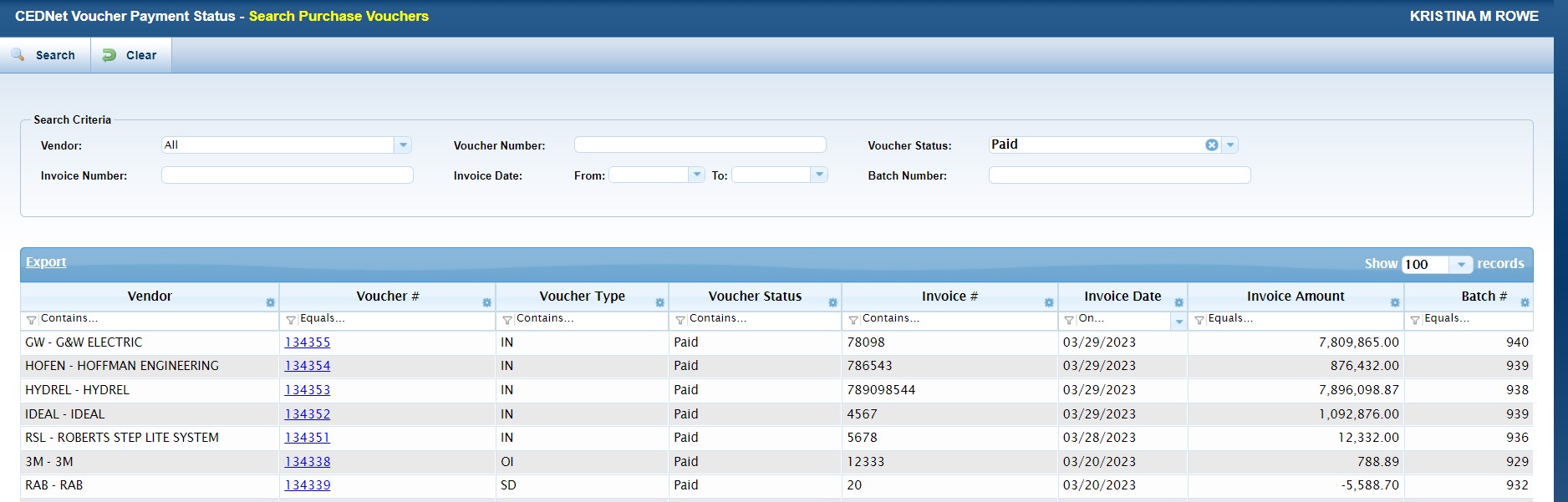
Search Criteria
| Field | Description |
|---|---|
| Vendor | Enter the Vendor associated with the Purchase Voucher. |
| Voucher # |
Enter the Voucher Number. |
| Voucher Status | Enter the Voucher Status. This screen displayed vouchers in Paid or Batched status. |
| Invoice Number | Enter the Invoice Number. |
| Invoice Date | Enter a range of dates that includes the date of the invoice. |
| Batch # | Enter the Batch # the voucher is included on. |
Grid
| Field | Description |
|---|---|
| Vendor | Displays the Vendor associated with the Purchase Voucher. |
| Voucher # | Displays the Voucher Number. Click any linked voucher # to see the Voucher Details and Payment Details for that voucher. |
| Voucher Type |
Displays the Voucher Type. Valid types include: BB IN OI SC SD SX |
| Voucher Status | Displays the Voucher Status. Valid statuses(for this screen) are Paid or Batched. |
| Invoice Number | Displays the Invoice Number paid on the associated Voucher. |
| Invoice Date | Displays the date of the Invoice. |
| Invoice Amount | Displays the amount of the invoice. |
| Batch # | Displays the Batch # that includes the listed voucher. |
Purchase Vouchers Details
This screen includes information about the purchase voucher, the invoice, and the payment details. To view this information, click the linked Voucher # from the the CEDNet Voucher Payment Status - Search Purchase Vouchers screen.
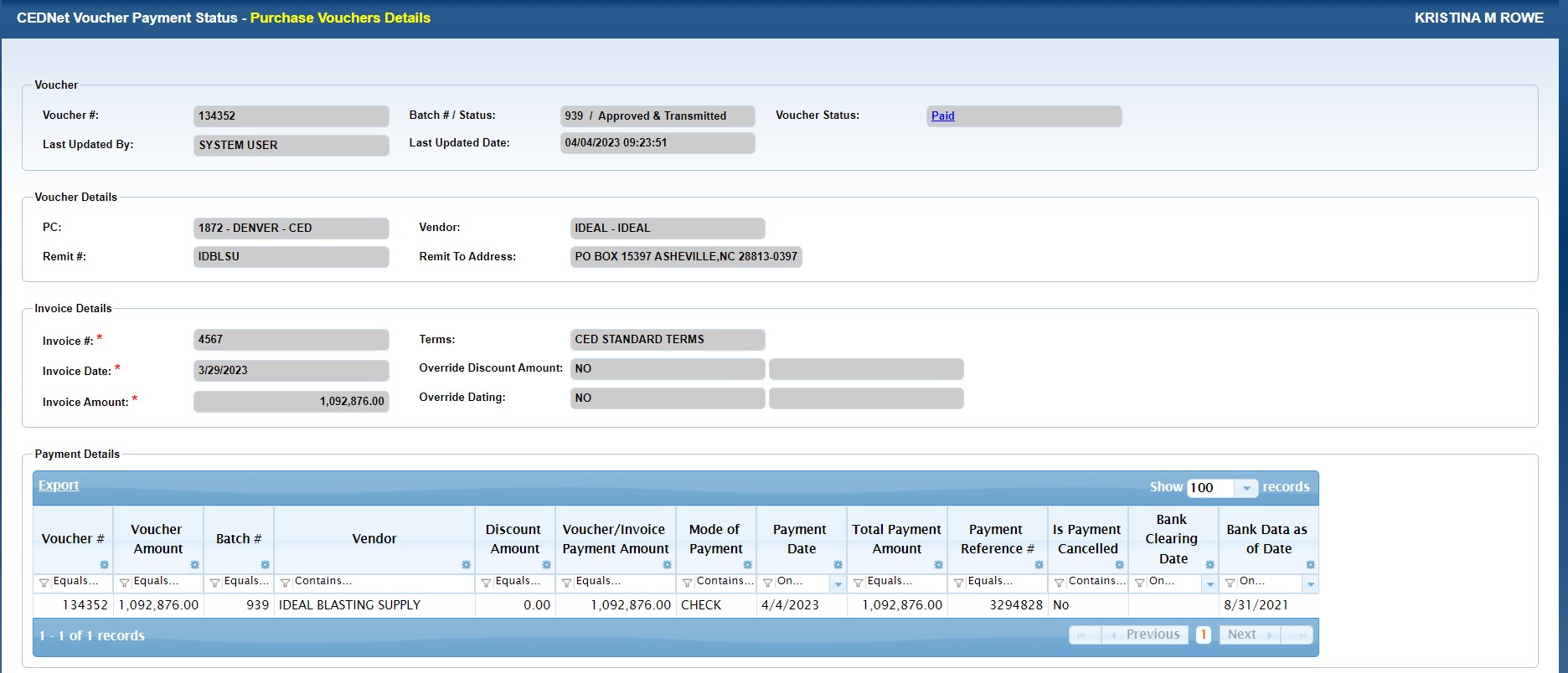
| Field | Description |
|---|---|
| Voucher Box | |
| Voucher # | Displays the Voucher Number. |
| Batch #/Status |
Displays the Batch number which includes the voucher and the status of the Batch. Valid batch statuses include:
|
| Voucher Status | Displays the status of Batched or Paid vouchers. |
| Last Updated By | Displays the last date a status changed or changes were made to the voucher. |
| Last Updated Date | Displays the user name of the last person to update the voucher. |
| Voucher Details Box | |
| PC | Displays the PC number the voucher/payment is from. |
| Vendor | Displays the vendor associated with the voucher. |
| Remit # | Displays the transaction number assigned to the payment remittance. |
| Remit to Address | Displays the address payment was remitted to. |
| Invoice Details Box | |
| Invoice # | Displays the invoice number. |
| Terms | Displays CED Standard Terms if these apply. If these terms are overridden, details appear in additional fields below. |
| Invoice Date | Displays the date of the invoice. |
| Override Discount Amt | Displays the dollar amount of a discountapplied in place of the standard terms discount. |
| Invoice Amt | Displays the amount of the invoice. |
| Override Dating | Displays any override dates regarding the payment due date. |
Grid
| Field | Description |
|---|---|
| Voucher # | Displays the Voucher Number. Click any linked voucher # to see the Voucher Details and Payment Details for that voucher. |
| Voucher Amount |
Displays the Voucher Amount.
|
| Batch # | Displays the Batch # that includes the listed voucher. |
|
Vendor |
Displays the Vendor associated with the Purchase Voucher. |
| Discount Amount | Displays the dollar amount of a discount applied in place of the standard terms discount. |
| Voucher/Invoice Payment Amount | Displays the amount paid toward this invoice on the voucher. |
| Mode of Payment | Displays the method of payment. |
| Payment Date | Displays the date the payment was issued. |
| Total Payment Amount | Displays the full amount of the payment voucher. |
| Payment Reference # | Displays any applicable reference number for the payment such as a check number. |
| Is Payment Cancelled | Displays 'Yes' or 'No' to indicate whether or not the payment has been canceled. |
| Bank Clearing Date | Displays the date the payment settled, or cleared the bank. If the payment was voided or cancelled this column will be blank. This information will be shown regardless of the expense vendor payment status. |
| Bank Data as of Date | Displays the last date a bank statement was generated. The Bank Data as of Date is periodically updated based on the timing of bank statements. |